Flic Home

    Community

    • Login
    • Search
    • Popular
    • Users

    Flic twist not working with Sonos

    General Discussion
    2
    10
    343
    Loading More Posts
    • Oldest to Newest
    • Newest to Oldest
    • Most Votes
    Reply
    • Reply as topic
    Log in to reply
    This topic has been deleted. Only users with topic management privileges can see it.
    • HSDK
      HSDK last edited by

      Just got my flic twist and the hub, but can’t get it to turn volume up down (or any other Sonos related actions).

      Running on firmware 4.5.1

      When I setup Sonos provider on the hub, all my speakers are just listed as “Sonos” with different ip’s.

      When I setup Sonos in the provider in the Phone section ( or the hub), there I see the correct speaker names.

      Tried all kind of delete/re-add, no luck.

      Any clues?

      Emil 2 Replies Last reply Reply Quote 0
      • Emil
        Emil FlicTeam @HSDK last edited by

        @HSDK Do you mean that the Sonos integration works as follows:

        • Android: Yes
        • iOS: No
        • Flic Hub: No

        ?

        1 Reply Last reply Reply Quote 0
        • HSDK
          HSDK @Emil last edited by

          @Emil I tried out with an android, and it actually worked - thanks for that input.

          Although, how come it doesn't work with iOS?

          Emil 1 Reply Last reply Reply Quote 0
          • Emil
            Emil FlicTeam @HSDK last edited by Emil

            @HSDK Do you possibly have an Android phone or tablet device? I would like to know if it can be controlled by the Flic app on that platform if possible (without involving any Flic Hub).

            HSDK 1 Reply Last reply Reply Quote 0
            • HSDK
              HSDK @Emil last edited by

              @Emil Have a new amp with two speaker and sub, couple of others and a playbar, none of them can be controlled - tried them all and also tried your suggestions.

              Here is the json from the Amp

              {
                "_objectType": "discoveryInfo",
                "device": {
                  "_objectType": "deviceInfo",
                  "id": "RINCON_804AF2AFAF2F01400",
                  "serialNumber": "80-4A-F2-AF-AF-2F:A",
                  "model": "S16",
                  "modelDisplayName": "Amp",
                  "color": "Black",
                  "capabilities": [
                    "CLOUD",
                    "HT_PLAYBACK",
                    "PLAYBACK",
                    "HT_POWER_STATE",
                    "AIRPLAY",
                    "LINE_IN",
                    "AUDIO_CLIP",
                    "SPEAKER_DETECTION",
                    "IR_CONTROL",
                    "HDMI"
                  ],
                  "deviceFeatures": [
                    {
                      "_objectType": "feature",
                      "name": "SUB_OUT"
                    },
                    {
                      "_objectType": "feature",
                      "name": "RCA_LINE_IN"
                    },
                    {
                      "_objectType": "feature",
                      "name": "SPEAKER_OUT"
                    },
                    {
                      "_objectType": "feature",
                      "name": "HDMI_ARC"
                    },
                    {
                      "_objectType": "feature",
                      "name": "IR_SENSOR"
                    },
                    {
                      "_objectType": "feature",
                      "name": "BLE"
                    },
                    {
                      "_objectType": "feature",
                      "name": "HT_SOURCE"
                    },
                    {
                      "_objectType": "feature",
                      "name": "CAPTOUCH_ABC"
                    },
                    {
                      "_objectType": "feature",
                      "name": "BUTTON_JOIN"
                    },
                    {
                      "_objectType": "feature",
                      "name": "CONCURRENT_2GHZ_5GHZ"
                    },
                    {
                      "_objectType": "feature",
                      "name": "WIFI_5GHZ"
                    },
                    {
                      "_objectType": "feature",
                      "name": "WIFI_2GHZ"
                    },
                    {
                      "_objectType": "feature",
                      "name": "2PORT_SWITCH"
                    },
                    {
                      "_objectType": "feature",
                      "name": "ETHERNET"
                    },
                    {
                      "_objectType": "feature",
                      "name": "WIFI"
                    },
                    {
                      "_objectType": "feature",
                      "name": "EQ_BALANCE"
                    },
                    {
                      "_objectType": "feature",
                      "name": "LED_STATUS"
                    },
                    {
                      "_objectType": "feature",
                      "name": "DUAL_MONO"
                    },
                    {
                      "_objectType": "feature",
                      "name": "HLS_V7"
                    },
                    {
                      "_objectType": "feature",
                      "name": "CONTROLLER_CFG_SATELLITE"
                    },
                    {
                      "_objectType": "feature",
                      "name": "WIRELESS_SONOSNET"
                    },
                    {
                      "_objectType": "feature",
                      "name": "WIDEVINE"
                    },
                    {
                      "_objectType": "feature",
                      "name": "EQ_COLLECTION"
                    },
                    {
                      "_objectType": "feature",
                      "name": "TUNABLE_CROSSOVER"
                    },
                    {
                      "_objectType": "feature",
                      "name": "DETECT_SPEAKERS"
                    },
                    {
                      "_objectType": "feature",
                      "name": "ROOM_DETECTION_CHIRP"
                    },
                    {
                      "_objectType": "feature",
                      "name": "ATE"
                    }
                  ],
                  "apiVersion": "1.49.0",
                  "minApiVersion": "1.1.0",
                  "versions": {
                    "_objectType": "sdkVersions",
                    "controlAPI": [
                      "3.2.0",
                      "1.49.0"
                    ],
                    "trueplaySDK": [
                      "6"
                    ],
                    "audioTxProtocol": [
                      3
                    ],
                    "htAudioTxProtocol": [
                      7
                    ]
                  },
                  "name": "Ceiling + SUB",
                  "websocketUrl": "wss://192.168.99.114:1443/websocket/api",
                  "softwareVersion": "92.0-70280",
                  "hwVersion": "1.24.1.21-2.2",
                  "swGen": 2,
                  "quarantineReasons": []
                },
                "householdId": "Sonos_VpSdct4RFIdZNaJrsIMEeWWwGX.pyVFx-YKa4bpva_FDALB",
                "locationId": "lc_fc2190ca9bf646698024cda8056641de",
                "playerId": "RINCON_804AF2AFAF2F01400",
                "groupId": "RINCON_7828CA8370DE01400:163949978",
                "websocketUrl": "wss://192.168.99.114:1443/websocket/api",
                "restUrl": "https://192.168.99.114:1443/api",
                "allowGuestAccess": true,
                "credentialTypeAllowed": "API_KEY"
              }
              
              1 Reply Last reply Reply Quote 0
              • Emil
                Emil FlicTeam last edited by

                May I ask what kind of sonos device it is, and if it is a rather new or an old one? (model type)

                If only the IP address gets listed with the generic name "Sonos", it means that it found the device during a network scan, but communication with it later failed.

                I guess you have tried to log out from your Sonos account and log back in again (in case your access token for some reason has become invalid)? Also tried to reboot your flic hub?

                Could you please give me the text output that you can see in a browser if you go to http://sonos-ip-address:1400/info ?

                HSDK 1 Reply Last reply Reply Quote 0
                • HSDK
                  HSDK last edited by

                  Hi @Emil any clue what I can do, I can not use the product as intended 😞

                  1 Reply Last reply Reply Quote 0
                  • HSDK
                    HSDK @Emil last edited by

                    @Emil Yeah, I should say:

                    When I setup Sonos provider while connected to the Hub, all my speakers are just listed as “Sonos” with different ip’s.

                    When I setup Sonos in the provider in the Phone while NOT connected to the Hub, there I see the correct speaker names.

                    1 Reply Last reply Reply Quote 0
                    • HSDK
                      HSDK @Emil last edited by

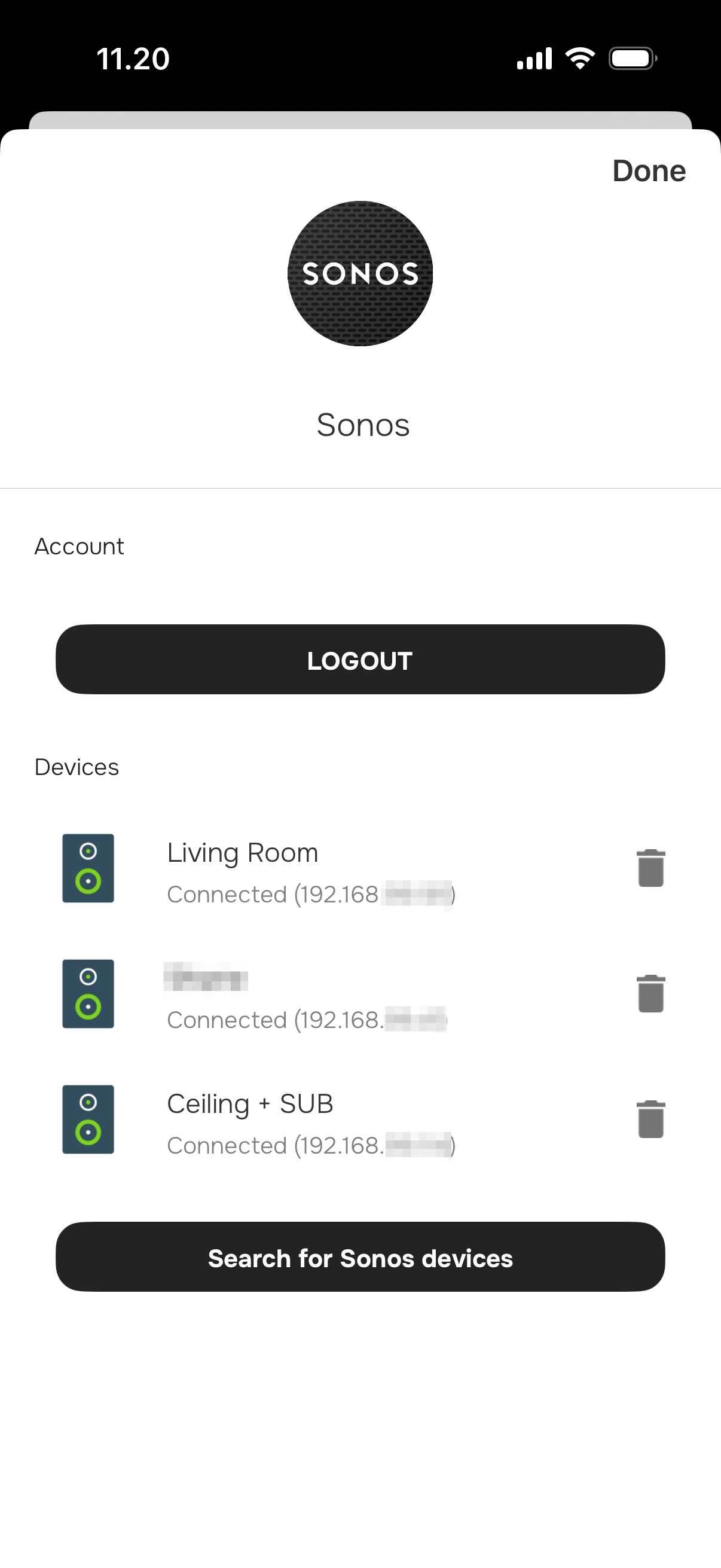
                      @Emil attached image when I'm NOT connected to the Hub. Once connected ti the Hub and I pull the list of providers, and go to Sonos - all speakers are listed as "Sonos" with IP only.

                      Also, when connected to hub, I see each individual device as "Sonos". When NOT connected to Hub, I actually see the grouped/bundled devices with their correct name.
                      IMG_4676-2.png

                      Not currently home, so can not pull list to show how it looks when connected to Hub.

                      1 Reply Last reply Reply Quote 0
                      • Emil
                        Emil FlicTeam @HSDK last edited by

                        I don't understand. You say: "When I setup Sonos provider on the hub, all my speakers are just listed as “Sonos” with different ip’s." but also "( or the hub), there I see the correct speaker names". So do you see the correct name when connected to a Flic hub or not?

                        HSDK 2 Replies Last reply Reply Quote 0
                        • First post
                          Last post